

What is a card reader?
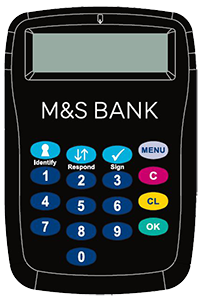
A card reader is a small handheld device that uses your credit card and PIN to generate a secure one-time passcode to confirm an online card payment is being made by you and not a fraudster.
To order a card reader for confirming online payments, get in touch via our contact us page.
Watch our how-to video or read our step by step guides below to find out how it works.
How to verify online card payments using a card reader
- Step 1: When making a payment online, before you can complete the payment a verification screen will pop up with instructions on how you can confirm your identity using a card reader
- Step 2: Instructions will then appear on how to confirm your payment using your card reader. Insert your M&S Credit Card into the top of your card reader and press ‘Respond’
- Step 3: Then, enter your M&S Credit Card PIN and press OK
- Step 4: Enter the authentication code shown on the payment screen and press OK
- Step 5: The card reader will generate an 8-digit, secure, one-time passcode. Enter this code on the payment screen and press the ‘Submit’ button to confirm the transaction
You'll see a confirmation of your payment on the checkout screen.